Building Robust Python Projects: Essential Tools and CI/CD Practices
Learn how to set up a Python project with Poetry, Ruff, and MyPy to ensure code quality and maintainability, and establish a CI/CD pipeline for automated checks.
21 juillet 2024
Published
Hugo Mufraggi
Author
Building Robust Python Projects: Essential Tools and CI/CD Practices
Today, I propose a series of articles about Python. This series will focus on code quality and maintainability. I aim to share my recent discoveries and help you start your future Python project on the right foot. The final objective is to create a maintainable and testable API using FastAPI, Pydantic, and an SQLite database.
Project Initiation
Python is a fantastic language widely used in the industry. However, it can be easy to produce spaghetti code without proper practices. But with the right tooling, you can drastically improve your code quality.
I will use:
- Poetry for dependency management. Please stop using just a
venvandrequirements.txt. They are sources of problems in team environments. Poetry functions as a comprehensive package manager where you can define everything. If you want to create and publish your package, Poetry can help with that as well. - Ruff is used as a linter and formatter. It is created by the Astral team, written in Rust, and is blazing fast.
- MyPy is a utility package for enforcing type annotations in your Python code.
With these three tools, we will establish a strong foundation for your project and automate all checks with a robust CI/CD pipeline.
Poetry
First, you need to install Poetry (installation instructions). I installed it on my Mac M1 Pro, which was quite straightforward. A coworker and I also installed Poetry on Windows, which is possible but slightly more complicated.
I assume you have installed Poetry, created your repository on GitHub, and cloned it.
Inside your project directory, you want to initialize your Poetry project:
poetry init
At the end of the configuration, Poetry will create a pyproject.toml file. If you have developed with JavaScript or TypeScript, it is similar to the package.json file.
With Poetry, you can differentiate between development dependencies and regular dependencies. To add a package, use the following commands:
# For development dependencies
poetry add --dev PACKAGE_NAME
# For regular dependencies
poetry add PACKAGE_NAME
Ruff
Ruff is a linter and formatter. It analyzes source code to detect errors, style issues, and bad programming practices. By flagging deviations from defined standards, it helps maintain clean and consistent code, making code maintenance easier and improving overall code quality.
poetry add --dev ruff
With this command, we install Ruff as a development dependency. Next, we need to define the Ruff configuration in the pyproject.toml file. You can refer to this part of the documentation for more customization options. Here is my setup:
[tool.ruff]
line-length = 120
target-version = "py311"
select = ["E", "F", "I"]
ignore = ["D100", "D104", "I001"]

[tool.ruff.per-file-ignores]
"__init__.py" = ["F401"]
"tests/*" = ["D"]
MyPy
MyPy is used to check the type correctness of Python code by performing static type analysis. It ensures that the code adheres to specified type annotations, helping to catch type-related errors early. This improves code reliability and maintainability.
[tool.mypy]
disallow_untyped_defs = true
disallow_incomplete_defs = true
For the example, I created a main.py with some errors:
def add(a: int, b: int) -> int:
    return a + b

if __name__ == '__main__':
    print(add(1, "2"))
If I run poetry run mypy ., I get the following output:
main.py:1: error: Function is missing a return type annotation  [no-untyped-def]
main.py:1: error: Function is missing a type annotation for one or more arguments  [no-untyped-def]
main.py:5: error: Argument 2 to "add" has incompatible type "str"; expected "int"  [arg-type]
Found 3 errors in 1 file (checked 1 source file)
- One error for the missing type annotation of the variable
a - One error for the missing return type annotation
- One error for the type error with
"2"being a string
CI/CD
Now that we have everything to maintain a high level of code quality let’s set up a CI/CD pipeline.
My repository is stored on GitHub, but you can also use other providers.
We want only two jobs: one for Ruff and one for MyPy. These two jobs should run on each push.
name: Lint and Type Check
on:
  push:
jobs:
  lint-and-type-check:
    runs-on: ubuntu-latest
    steps:
    - uses: actions/checkout@v3
    - name: Set up Python
      uses: actions/setup-python@v4
      with:
        python-version: '3.12'
    - name: Install Poetry
      run: |
        curl -sSL <https://install.python-poetry.org> | python3 -
    - name: Configure Poetry
      run: |
        poetry config virtualenvs.in-project true
    - name: Install dependencies
      run: poetry install
    - name: Run linter
      run: poetry run ruff check .
    - name: Run type checker
      run: poetry run mypy .
When I push, it triggers my CI/CD pipeline, and my CI is in error.
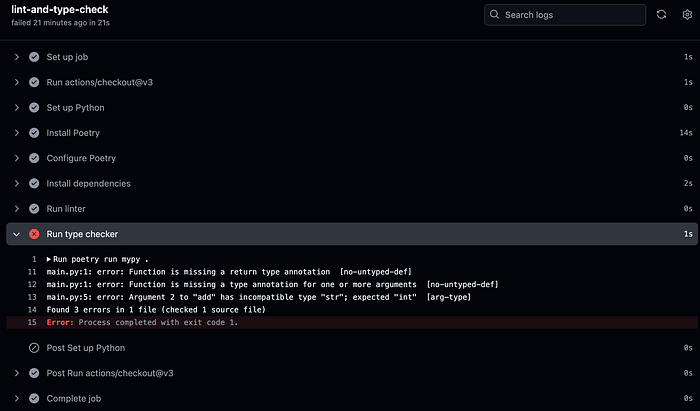
I need to fix my main.py and re-push.
Now, my CI/CD pipeline ensures the code quality produced by me and my team members.
Congratulations on implementing your first CI/CD pipeline! In the next few articles, I will focus on software architecture concepts, create a SQLite repository, and test it. If you don’t want to miss my future posts, follow me, and feel free to share your thoughts.
See you soon!