🧵 From Virtual Threads to Distributed ETL with Effect & Cluste
Discover how to build a distributed ETL system in TypeScript using Effect.ts and Effect Cluster. Learn to coordinate workers, manage sharding, and ensure data consistency through a clean functional architecture.
3 août 2025
Published
Hugo Mufraggi
Author
Continuation of my last article, where I implemented a virtual thread system with Effect [LINK].
Follow-up: I had interesting exchanges about the limitations of the pattern I showed in the last article.
I've got you covered in this article; I'll take you further with me from here. We will use the cluster package to manage a cluster of programs and unlock the distribution system.
Don't be afraid, I built that step by step.
When and What
During your journey as a developer, you need to solve some problems. These problems can take more time or can't be executed inside a simple script. In my previous article I listed some use cases [LINK]. I'm going fast, but you might want to distribute some actions to another instance and not do everything in the endpoint call connection. Examples:
- CQRS projection
- Email Sending
- ETL
- Report generation
For the content of this article, I'll build a complete ETL system managed by an API.
The Scenario
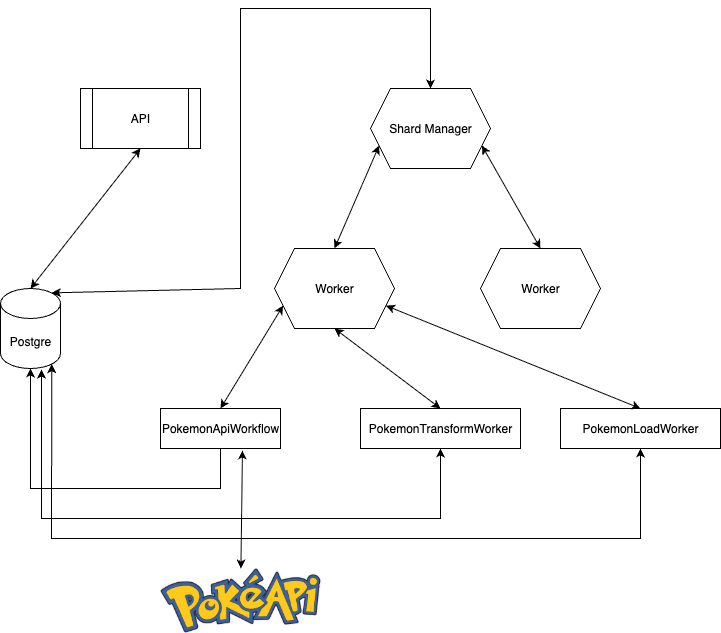
The scenario is the following:
- One API with 2 endpoints:
- Synchronize pokemon by id and run the ETL pokemon synchronization
- Get pokemon by id
- One Postgres for everything, we use it as principal data, data warehouse and Effect/cluster worker manager.
- Shard Manager is a program instance whose role is to manage all instances of the workers
- The workflow is a separate program. You can put multiple workflows inside a worker, and you can create different workers with different workflows.
Effect Cluster Under the Hood
Synchronization through DB and ShardManager
The database as synchronization point
- All workers read and write to the same database
- When a worker modifies data, other workers see the change on their next request
- The DB guarantees consistency: no corrupted data even with multiple simultaneous workers
- SQL transactions isolate operations between workers
The ShardManager: the coordinator
- It's a component that distributes work between workers
- It decides which worker processes which task
- Prevents two workers from processing the same thing simultaneously
- Manages load distribution automatically
How it works together
- The ShardManager assigns tasks: "Worker 1, process user ID 1-1000", "Worker 2, process user ID 1001-2000"
- Each worker executes its part using its DB connection
- If a worker fails, the ShardManager redistributes its work to others
- The DB remains the single source of truth for all data
Automatic synchronization
- No need to manually synchronize workers between themselves
- The DB + ShardManager handle everything
- Workers can start and stop independently
- The system remains consistent even if a worker crashes
In summary, the DB ensures data consistency, and the ShardManager ensures work distribution.
Practice Time
I made a public repo you can check out here.
It’s a monorepo using the Effect CLI to share as much code as possible across packages. I created seven packages:
- database: All model definitions and repositories; I also define my SQL client once here.
- domain: Shared types.
- server: API logic.
- shard-manager: Logic related to task coordination.
- workflow: All workflow logic.
- worker-etl: Initializes ETL workflows and worker logic.
To make it easier, I’ll split the practice section into 4 parts:
- Defining the API workflow
- Defining the transform workflow
- Defining the API
- Run everything and test
API Workflow
For the API workflow, I need three things:
- A
PokemonRawRepository - An
HttpClient - The clean workflow definition
To begin, I need to define the type for the API response.
import { Schema } from "effect"

export type PokemonSchema = typeof PokemonSchema.Type
export const PokemonSchema = Schema.Struct({
  pokedex_id: Schema.Number,
  generation: Schema.Number,
  category: Schema.String,
  name: Schema.Struct({
    fr: Schema.String,

    en: Schema.String,
    jp: Schema.String
  }),
  sprites: Schema.Struct({
    regular: Schema.String,
    shiny: Schema.String,
    gmax: Schema.NullOr(Schema.String)
  }),
  types: Schema.Array(
    Schema.Struct({
      name: Schema.String,
      image: Schema.String
    })
  ),
  talents: Schema.Array(
    Schema.Struct({
      name: Schema.String,
      tc: Schema.Boolean
    })
  ),
  stats: Schema.Struct({
    hp: Schema.Number,
    atk: Schema.Number,
    def: Schema.Number,
    spe_atk: Schema.Number,
    spe_def: Schema.Number,
    vit: Schema.Number
  }),
  resistances: Schema.Array(
    Schema.Struct({
      name: Schema.String,
      multiplier: Schema.Number
    })
  ),
  evolution: Schema.Struct({
    pre: Schema.NullOr(Schema.Unknown), // null ou autre objet inconnu
    next: Schema.Array(
      Schema.Struct({
        pokedex_id: Schema.Number,
        name: Schema.String,
        condition: Schema.String
      })
    ),
    mega: Schema.NullOr(Schema.Unknown)
  }),
  height: Schema.String,
  weight: Schema.String,
  egg_groups: Schema.Array(Schema.String),
  sexe: Schema.Struct({
    male: Schema.Number,
    female: Schema.Number
  }),
  catch_rate: Schema.Number,
  level_100: Schema.Number,
  formes: Schema.NullOr(Schema.Unknown)
})
Inside the database package, I create a PokemonRawModel and a PokemonRawRepository.
I store the response of the API call in JSON using PostgreSQL’s jsonb type.
import { Model } from "@effect/sql"
import { Schema } from "effect"
import { UUID } from "effect/Schema"

import { PokemonApiResponse } from "@template/domain"

export const Timestamp = Schema.Date

export class PokemonRawModel extends Model.Class<PokemonRawModel>("PokemonRawModel")({
  id: Model.Generated(UUID),
  content: PokemonApiResponse.PokemonSchema,
  createdAt: Model.Generated(Timestamp),
  updatedAt: Model.Generated(Timestamp)
}) {}
PokemonRawRepository
import { SqlSchema } from "@effect/sql"
import { PgClient } from "@effect/sql-pg"
import { PokemonApiResponse } from "@template/domain"
import { Effect, Option, pipe, Schema } from "effect"
import { PgLive } from "./Sql.js"

export class PokemonRawRepository extends Effect.Service<PokemonRawRepository>()("PokemonRawRepository", {
  effect: Effect.gen(function*() {
    const sql = yield* PgClient.PgClient

    const pokemonInsertSchema = SqlSchema.single({
      Request: Schema.Struct({ content: PokemonApiResponse.PokemonSchema }),
      Result: Schema.Struct({ id: Schema.UUID }),
      execute: ({ content: contentInsert }) => {
        // Serialize manually to JSON string
        const serialized = JSON.stringify(contentInsert)

        return sql`INSERT INTO pokemon_raw (content)
                           VALUES (${serialized}::jsonb)
                           RETURNING id`
      }
    })

    const insertPokemonRaw = (content: PokemonApiResponse.PokemonSchema) =>
      pipe(
        pokemonInsertSchema({ content }),
        Effect.orDie,
        Effect.withSpan("pokemonRepo.insertRaw")
      )

    const findByIdSchema = SqlSchema.findOne({
      Request: Schema.UUID,
      Result: Schema.Struct({
        id: Schema.UUID,
        content: Schema.String
      }),
      execute: (id) =>
        sql`select id, content::jsonb as content
                                 from pokemon_raw
                                 where id = ${id}`
    })
    const findByIdPokemonRaw = (id: string) =>
      pipe(
        findByIdSchema(id),
        Effect.flatMap(
          Option.match({
            onNone: () => Effect.succeed(Option.none()),
            onSome: (rawPokemon) =>
              pipe(
                Effect.try({
                  try: () => JSON.parse(rawPokemon.content),
                  catch: (e) => new Error("Failed to parse JSON content: " + String(e))
                }),
                Effect.flatMap((parsedContent) =>
                  Schema.decodeUnknown(PokemonApiResponse.PokemonSchema)(parsedContent)
                ),
                Effect.map((validatedContent) =>
                  Option.some({
                    id: rawPokemon.id,
                    content: validatedContent
                  })
                )
              )
          })
        ),
        Effect.orDie,
        Effect.withSpan("pokemonRepo.findByID")
      )
    return {
      findById: findByIdPokemonRaw,
      insertPokemonRaw
    }
  }),
  dependencies: [PgLive]
}) {
}
I define two simple functions: one for insert, one for findById.
Next, I define the workflow TransformPokemonRawWorkflow.
const TransformPokemonRawWorkFlow = Workflow.make({
  name: "TransformPokemonRawWorkFlow",
  success: Schema.Void,
  error: TransformPokemonRawError,
  payload: {
    idRaw: Schema.String
  },
  idempotencyKey: ({ idRaw }) => idRaw
})
Now we can define the workflow.
import { FetchHttpClient, HttpClient } from "@effect/platform"
import { Workflow } from "@effect/workflow"
import { PokemonRawRepository } from "@template/database"
import { PokemonApiResponse } from "@template/domain"
import { Effect, pipe, Schema } from "effect"
import { TransformPokemonRawWorkFlow } from "./TransformPokemonRaw.js"

class CallApiPokemonError extends Schema.TaggedError<CallApiPokemonError>(
  "CallApiPokemonError"
)("CallApiPokemonError", {
  message: Schema.String
}) {}

const CallPokemonApiWorkFlow = Workflow.make({
  name: "CallPokemonApiWorkFlow",
  success: Schema.Void,
  error: CallApiPokemonError,
  payload: {
    id: Schema.String,
    pokemonId: Schema.Int
  },
  idempotencyKey: ({ id }) => id
})

const makeCallPokemonApiWorkflowLogic = ({ id, pokemonId }: { id: string; pokemonId: number }) =>
  Effect.gen(function*() {
    const service = yield* CallPokemonApiService
    yield* service.run({ id, pokemonId })
  })

export class CallPokemonApiService extends Effect.Service<CallPokemonApiService>()(
  "CallPokemonApiService",
  {
    effect: Effect.gen(function*() {
      const repo = yield* PokemonRawRepository.PokemonRawRepository
      const httpClient = yield* HttpClient.HttpClient

      return {
        run: ({ pokemonId }: { id: string; pokemonId: number }) =>
          Effect.gen(function*() {
            const response = yield* httpClient.get(`https://tyradex.vercel.app/api/v1/pokemon/${pokemonId}`)
            const jsonData = yield* response.json
            const pokemon = yield* Schema.decodeUnknown(PokemonApiResponse.PokemonSchema)(jsonData)

            const pokeId = yield* repo.insertPokemonRaw(pokemon)
            console.log(pokeId)
            yield* TransformPokemonRawWorkFlow.execute({ idRaw: pokeId.id })
          }).pipe(
            Effect.catchAll((e) => Effect.fail(new CallApiPokemonError({ message: e.message })))
          )
      }
    }),
    dependencies: [PokemonRawRepository.PokemonRawRepository.Default, FetchHttpClient.layer]
  }
) {}

export { CallPokemonApiWorkFlow, makeCallPokemonApiWorkflowLogic }
CallPokemonApiWorkFlow Explanation
CallPokemonApiWorkFlow: Defines the workflow that will be triggered by the API.CallPokemonApiService: A service that wraps the logic (easier to test).makeCallPokemonApiWorkflowLogic: Entry point of the workflow logic.
Calling the Pokémon API
const response = yield* httpClient.get(...)
We call the API, decode the response using Schema.decodeUnknown, and store the result.
Save Raw Pokémon
const pokeId = yield* repo.insertPokemonRaw(pokemon)
We store the raw JSON from the API response in the database.
Trigger the Transform Workflow
yield* TransformPokemonRawWorkFlow.execute({ idRaw: pokeId.id }, { discard: true })
We trigger the second workflow and don’t wait for its result (discard: true).
And that’s it.
Defining the ETL Worker
We define a worker that will execute both workflows: the API call and the data transformation.
import { ClusterWorkflowEngine } from "@effect/cluster"
import { NodeClusterRunnerSocket, NodeRuntime } from "@effect/platform-node"
import { Sql } from "@template/database"

import {
  CallPokemonApiService,
  CallPokemonApiWorkFlow,
  makeCallPokemonApiWorkflowLogic
} from "@template/workflow/CallApiPokemon"
import {
  makeTransformPokemonRawWorkflowLogic,
  TransformPokemonRawService,
  TransformPokemonRawWorkFlow
} from "@template/workflow/TransformPokemonRaw"
import { Effect, Layer, Logger, LogLevel } from "effect"

console.log("🚀 Démarrage du runner...")

const RunnerLayer = ClusterWorkflowEngine.layer.pipe(
  Layer.provideMerge(NodeClusterRunnerSocket.layer({
    storage: "sql"
  })),
  Layer.provideMerge(Sql.PgLive)
)

const CallPokemonApiWorkflowLayer = CallPokemonApiWorkFlow.toLayer(makeCallPokemonApiWorkflowLogic).pipe(
  Layer.provideMerge(RunnerLayer),
  Layer.provideMerge(CallPokemonApiService.Default)
)
const TransformPokemonRawWorkFlowLayer = TransformPokemonRawWorkFlow.toLayer(makeTransformPokemonRawWorkflowLogic).pipe(
  Layer.provideMerge(RunnerLayer),
  Layer.provideMerge(TransformPokemonRawService.Default)
)

const program = Effect.gen(function*() {
  console.log("📝 Enregistrement du workflow EmailWorkflow...")

  // Attendre que tout soit prêt
  yield* Effect.sleep("2 seconds")
  console.log("✅ Runner prêt à recevoir des workflows")

  // Garder le runner en vie
  yield* Effect.never
})

const FullLayer = Layer.mergeAll(
  RunnerLayer,
  CallPokemonApiWorkflowLayer,
  TransformPokemonRawWorkFlowLayer,
  Logger.minimumLogLevel(LogLevel.Debug) // Plus de logs
)

NodeRuntime.runMain(program.pipe(Effect.provide(FullLayer)))
What’s happening?
- First, we define the
RunnerLayerthat connects with the cluster. - Then, we register the two workflow layers (API + transform).
- Next, we define our program and merge all layers.
- Finally, we run the program.
Transform Workflow
This workflow is pretty simple: we receive a UUID from the API workflow and then:
- Fetch the raw Pokémon using
PokemonRawRepository.findById - If not found, return an error
- If found, clean and transform the data
- Insert into the clean Pokémon table
All of this is wrapped in a TransformPokemonRawService.
import { Workflow } from "@effect/workflow"
import { PokemonRawRepository, PokemonRepository } from "@template/database"
import { Effect, Option, pipe, Schema } from "effect"

export class TransformPokemonRawError extends Schema.TaggedError<TransformPokemonRawError>(
  "TransformPokemonRawError"
)("TransformPokemonRawError", {
  message: Schema.String
}) {}

const TransformPokemonRawWorkFlow = Workflow.make({
  name: "TransformPokemonRawWorkFlow",
  success: Schema.Void,
  error: TransformPokemonRawError,
  payload: {
    idRaw: Schema.String
  },
  idempotencyKey: ({ idRaw }) => idRaw
})

const makeTransformPokemonRawWorkflowLogic = ({ idRaw }: { idRaw: string }) =>
  Effect.gen(function*() {
    const service = yield* TransformPokemonRawService
    yield* service.run({ idRaw })
  })

export class TransformPokemonRawService extends Effect.Service<TransformPokemonRawService>()(
  "TransformPokemonRawService",
  {
    effect: Effect.gen(function*() {
      const repo = yield* PokemonRawRepository.PokemonRawRepository
      const pokemonRepo = yield* PokemonRepository.PokemonRepository

      return {
        run: ({ idRaw }: { idRaw: string }) =>
          Effect.gen(function*() {
            yield* pipe(
              repo.findById(idRaw),
              Effect.flatMap(Option.match({
                onNone: () => Effect.fail(new TransformPokemonRawError({ message: "poke id not found" })),
                onSome: (p) => Effect.succeed(p)
              })),
              Effect.flatMap(({ content }) =>
                pokemonRepo.insert({
                  idApiStep: idRaw,
                  pokedexId: content.pokedex_id,
                  generation: content.generation,
                  category: content.category,
                  nameFr: content.name.fr,
                  spriteRegular: content.sprites.regular,
                  spriteShiny: content.sprites.shiny,
                  hp: content.stats.hp,
                  atk: content.stats.atk,
                  def: content.stats.def,
                  speAtk: content.stats.spe_atk,
                  speDef: content.stats.spe_def,
                  vit: content.stats.vit
                })
              ),
              Effect.flatMap((res) => Effect.logInfo(`pokemon ${res.pokedexId} inserted`)),
              Effect.map(() => Effect.void)
            )
          }).pipe(
            Effect.catchAll((e) => Effect.fail(new TransformPokemonRawError({ message: e.message })))
          )
      }
    }),
    dependencies: [
      PokemonRawRepository.PokemonRawRepository.Default,
      PokemonRepository.PokemonRepository.Default
    ]
  }
) {}

export { makeTransformPokemonRawWorkflowLogic, TransformPokemonRawWorkFlow }
The API
To keep this article focused, I won’t go into full detail about the API. If you want, I have other articles explaining API structure with Effect.
I'll just show how the endpoints are grouped:
POST /pokemon/:id: Triggers the ETL for a given Pokémon IDGET /pokemon/:id: Reads the transformed Pokémon from the DB
import { HttpApiBuilder, HttpApiEndpoint, HttpApiGroup, HttpApiSchema } from "@effect/platform"
import { PokemonModel } from "@template/database/pokemonModel"
import { PokemonRepository } from "@template/database/PokemonRepository"
import { CallApiPokemon } from "@template/workflow"
import { Effect, Layer, Option, pipe, Schema } from "effect"
import type { ApiType } from "../Api.js"

export class PokemonNotFound extends Schema.TaggedError<PokemonNotFound>()(
  "PokemonNotFound",
  { id: Schema.String },
  HttpApiSchema.annotations({ status: 404 })
) {}

export class HttpApiGroupPokemon extends HttpApiGroup.make("@Group/Pokemon")
  .add(
    HttpApiEndpoint.post("syncPokemonById", "/:id")
      .setPath(Schema.Struct({
        id: pipe(
          Schema.NumberFromString, // parse string → number
          Schema.int()
        )
      }))
      .addSuccess(Schema.Struct({
        id: pipe(
          Schema.NumberFromString,
          Schema.int()
        )
      }))
  )
  .add(
    HttpApiEndpoint.get("getPokemonById", "/:id")
      .setPath(Schema.Struct({
        id: Schema.UUID
      }))
      .addSuccess(PokemonModel)
      .addError(PokemonNotFound)
  )
  .prefix("/pokemon")
{
}

export const HttpApiGroupPokemonLive = (api: ApiType) =>
  HttpApiBuilder.group(
    api,
    "@Group/Pokemon",
    (handlers) =>
      Effect.gen(function*() {
        yield* Effect.log("aa")
        const repo = yield* PokemonRepository

        return handlers
          .handle("syncPokemonById", ({ path }) =>
            pipe(
              CallApiPokemon.CallPokemonApiWorkFlow.execute(
                { id: new Date().toString(), pokemonId: path.id },
                {
                  discard: true
                }
              ),
              Effect.flatMap(() => Effect.succeed({ id: path.id }))
            ))
          .handle("getPokemonById", ({ path }) =>
            repo.findById(path.id)
              .pipe(
                Effect.flatMap(
                  Option.match({
                    onNone: () => Effect.fail(new PokemonNotFound({ id: path.id })),
                    onSome: (p) => Effect.succeed(p)
                  })
                )
              ))
      })
  ).pipe(Layer.provide(PokemonRepository.Default))
Let’s Run Everything
Now you’ve got everything you need to run and test the ETL!
Clone the repo and check out each main.ts or bin.ts file to understand how things work.
To run:
tsx packages/server/src/main.ts→ start the APItsx packages/workerEtl/src/bin.ts→ start the workertsx packages/shardManager/src/bin.ts→ start the Shard Manager
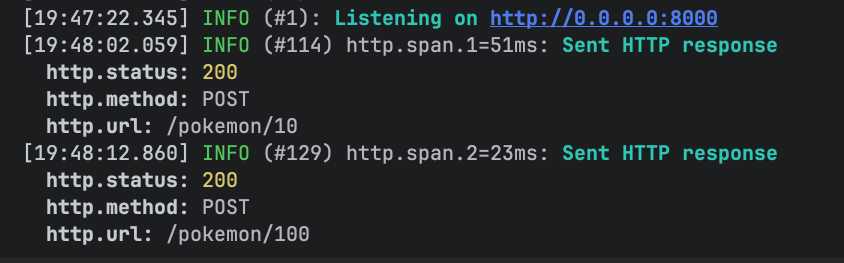
First, I send Pokémon IDs 10 and 100 for synchronization.
Then I check if the Pokémon with ID 10 is synced:

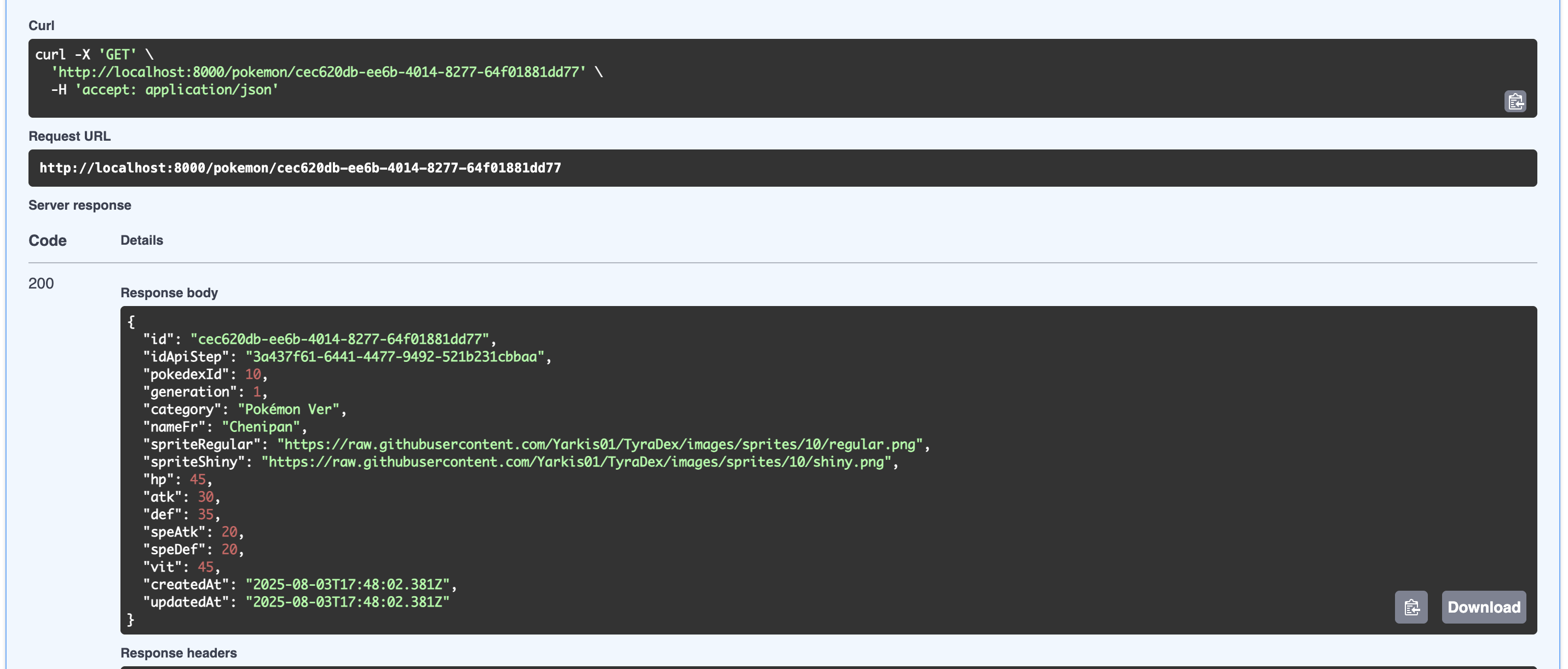
Finally, I use the Swagger UI to GET the Pokémon by ID and see the cleaned data.
Conclusion
Effect + Effect Cluster make it very easy to build multi-worker architectures in the TypeScript ecosystem. You can build robust systems that distribute workloads across machines or pods.
With a monorepo approach, you improve the consistency of types between your API, workers, and shard manager.
I hope this article helped you discover the power of @effect/cluster! 🚀