Implementing Vertical Slice Architecture in Flutter
Explore how to implement Vertical Slice Architecture in Flutter to improve code readability, testability, and maintainability by isolating features into distinct modules.
8 juin 2025
Published
Hugo Mufraggi
Author

Implementing Vertical Slice Architecture In Flutter
In this article, we will see how to implement a vertical slice architecture with Flutter.
✅ TL;DR
- Vertical Slice Architecture is inspired by Clean Architecture, aiming to isolate each feature into its module — from domain to UI.
- It improves readability, testability, and maintainability while reducing cognitive load.
- In Flutter, it works well with tools like BLoC for state management and GetIt for dependency injection.
- Each feature resides in its folder, which includes subfolders such as application, data, domain, and presentation.
Who am I?
A few words about me: I’m a software engineer, mainly focused on software architecture, especially on the backend and data side. One of my key motivations is to continuously discover ways to enhance the reliability and speed of delivery.
I’m not a mobile developer, but I recently developed a small app for my Brazilian Jiu-Jitsu gym. So take a step back, grab what makes sense to you, and try it out. What I’m going to share is theoretical, and theory alone is useless without practice.
📚 Resources
I have two links for you:
- Clean Architecture by Robert C. Martin is an excellent book for learning about software architecture and understanding its necessity. Book on Amazon (non-affiliate link) / Blog post by Uncle Bob
- CTO Inshape podcast — A French podcast about clean and vertical slice architecture. It is a very relevant resource. 🎧 Watch here
Clean Architecture / Vertical Slice / Screaming Architecture
We have theories that aim to answer the question of “Why and how should we structure software?” These theories were developed to address real-world problems in shipping software. Our profession is still young, so it’s necessary to theorize how to write better code and how to improve the value delivered at each release.
The first time I tried to implement clean architecture was on the backend, with Rust. Since then, I kept asking myself: Is it possible to apply clean architecture on the frontend, too?
Quick Definition
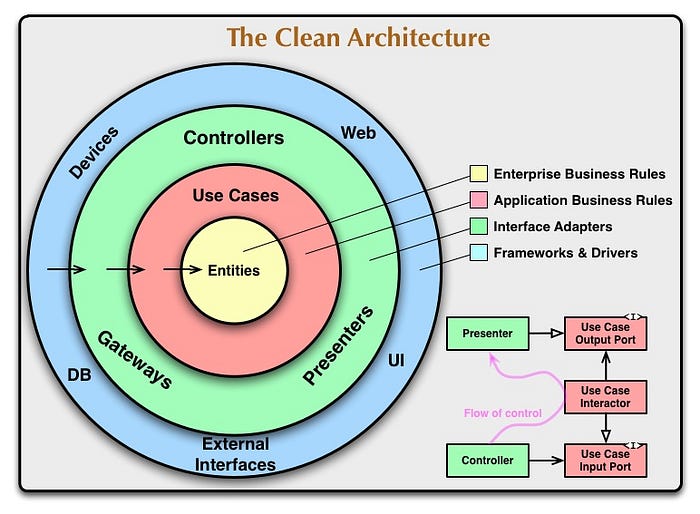
Clean Architecture, introduced by Robert C. Martin (Uncle Bob), is a software design philosophy that separates an application into layers with distinct responsibilities. The goal is to make systems:
- Independent of frameworks
- Testable
- Independent of UI
- Independent of databases
- Independent of external tools
At the heart of this architecture is the Dependency Rule: dependencies must point inward, meaning inner layers (business rules, domain) should not depend on outer layers (UI, DB, frameworks).
Vertical Slice Architecture
Vertical slice architecture is an extension of clean architecture, focused on delivering features independently. Each feature is isolated in its folder, minimizing coupling.
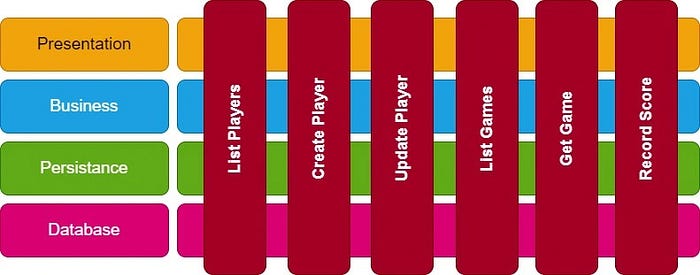
Goals
You get all the benefits of clean architecture:
- Separation of concerns
- Technological independence
- Testability
- Maintainability
- Flexibility and scalability
- Lower cognitive load: When a developer needs to fix or change something, they only open the relevant feature folder. There’s zero risk of causing regressions in unrelated parts of the codebase.
Flutter with Vertical Slice
The biggest challenge is: how do we implement it in Flutter? For me, the most essential aspect is the Separation of Concerns.
We’ll use two tools:
- A state management library, like BLoC, separates UI logic from core logic. With this approach, your widgets are “dumb”, making them easier to test.
- GetIt, a dependency injection package. It helps decouple the logic, improving testability and maintainability.
Folder Architecture
Each feature is structured independently, like this:
playersDetails
│       ├── application
│       │   └── GetPlayersDetails.dart
│       ├── data
│       │   └── repository
│       │       └── players_details_repository_impl.dart
│       ├── domain
│       │   ├── entities
│       │   │   └── playersDetails.dart
│       │   └── repository
│       │       └── players_details_repository.dart
│       └── presentation
│           ├── bloc
│           │   ├── players_details_bloc.dart
│           │   ├── players_details_event.dart
│           │   └── players_details_state.dart
│           ├── pages
│           │   └── players_details_bottom_sheet.dart
│           └── widgets
│               ├── details
│               │   ├── ArchiveGoal.dart
│               │   ├── CirculareFeeling.dart
│               │   ├── Feeling.dart
│               │   ├── Header.dart
│               │   └── PlayersGoalAndNotes.dart
│               └── players_details_bottom.dart
Folder Breakdown
- application/GetPlayersDetails.dart: This is your use case layer. It abstracts how the data is retrieved and coordinates the logic.
- data/repository/players_details_repository_impl.dart: Implements the data access. This could be an API, a local DB, or even an in-memory store (useful for development and testing).
- domain/repository/players_details_repository.dart: The interface for your repository. Straightforward — often just 3 lines.
- domain/entities/playersDetails.dart: Domain model that describes your business object (e.g., player details).
- presentation/bloc: Manages the state. Acts as a bridge between the UI and the use case.
- presentation/pages/players_details_bottom_sheet.dart: Entry point of the page. A StatefulWidget where the bloc is instantiated.
- presentation/widgets/players_details_bottom.dart: Assembles all widgets for the final view.
- presentation/widgets/details/: Contains all the UI components used to build the interface. Each is a Stateless widget.
With Multiple Features
Here’s an example of how your repo might look with several features:
lib
├── features
│   ├── playersCards
│   │   ├── applications
│   │   │   └── GetPlayersCards.dart
│   │   ├── data
│   │   │   └── repository
│   │   │       └── players_card_repository_impl.dart
│   │   ├── domain
│   │   │   ├── repository
│   │   │   │   └── players_card_repository.dart
│   │   │   └── playersCard.dart
│   │   └── presentation
│   │       ├── bloc
│   │       │   ├── players_cards_event_bloc.dart
│   │       │   ├── players_cards_event_event.dart
│   │       │   └── players_cards_event_state.dart
│   │       ├── pages
│   │       │   └── players_cards_page.dart
│   │       └── widgets
│   │           ├── Card.dart
│   │           └── card
│   │               ├── Duration.dart
│   │               ├── FeelingMeter.dart
│   │               ├── FocusOfTheDay.dart
│   │               ├── Header.dart
│   │               ├── ShortNote.dart
│   │               └── Tags.dart
│   └── playersDetails
│       ├── application
│       │   └── GetPlayersDetails.dart
│       ├── data
│       │   └── repository
│       │       └── players_details_repository_impl.dart
│       │   ├── entities
│       │   │   └── playersDetails.dart
│       │   └── repository
│       │       └── players_details_repository.dart
│       └── presentation
│           ├── bloc
│           │   ├── players_details_bloc.dart
│           │   ├── players_details_event.dart
│           │   └── players_details_state.dart
│           ├── pages
│           │   └── players_details_bottom_sheet.dart
│           └── widgets
│               ├── details
│               │   ├── ArchiveGoal.dart
│               │   ├── CirculareFeeling.dart
│               │   ├── Feeling.dart
│               │   ├── Header.dart
│               │   └── PlayersGoalAndNotes.dart
│               └── players_details_bottom.dart
├── main.dart
Conclusion
This article aimed to lay the groundwork for applying Vertical Slice Architecture in a Flutter project. It’s an approach I’ve found super helpful — even though I’m not a mobile developer by trade.
If you enjoyed this format, I’d be happy to write a follow-up article — this time more hands-on, with real code, test examples, and tips for scaling your architecture properly.
But for that to happen, this article needs to resonate and reach people — so if you found it useful, like it, share it, or drop a comment to let me know! 💬🚀