Master Python: 5 Tips for Writing Efficient and Maintainable Code
Discover five essential tips to enhance your Python coding skills, focusing on writing cleaner, more efficient, and maintainable code.
31 août 2024
Published
Hugo Mufraggi
Author
5 Tips For Writing Efficient And Maintainable Code
Currently, at Invyo, I do most of my development work in Python. Initially, I came from a more strongly typed language like Go. I focus my research on making Python more robust and improving the code base’s quality. This article groups five tips to improve your code quickly and at zero cost.
Preamble:
I advise you to use in your CI/CD pipeline, pre-commit hooks, or manually some tools like:
- Ruff is a fast linter for Python that checks your code for common issues, enforces coding standards, and can automatically fix specific problems.
- MyPy is a static type checker for Python. It checks your code for type-related errors by analyzing type hints (annotations) you add to your Python code.
- Poetry, or Uv is a dependency management and packaging tool for Python. It handles installing and updating dependencies, creating virtual environments, and packaging your Python projects for distribution.
You can refer to my previous articles to learn more about these tools.
Tips 1: Branded Type
Problem Solved
While Python’s dynamic typing provides flexibility, it can sometimes lead to challenges in maintaining type safety and distinguishing between different values. Python developers can use a technique similar to TypeScript’s branded types to address these issues by creating unique, distinct types. This can be particularly useful for ensuring clarity and preventing errors in your code.
In Python, you can create branded types using classes or type aliases combined with the typing module. The concept is to add a unique identifier to a base type, making it distinct from other types that might otherwise be confused with it.
To learn more about branded typing, refer to my previous article. It is in TypeScript, but the logic and concept are the same.
Practice
For example, I made a standard function, like getting stuff with 2 UUIDs. In my case, the function is for a one-user car.
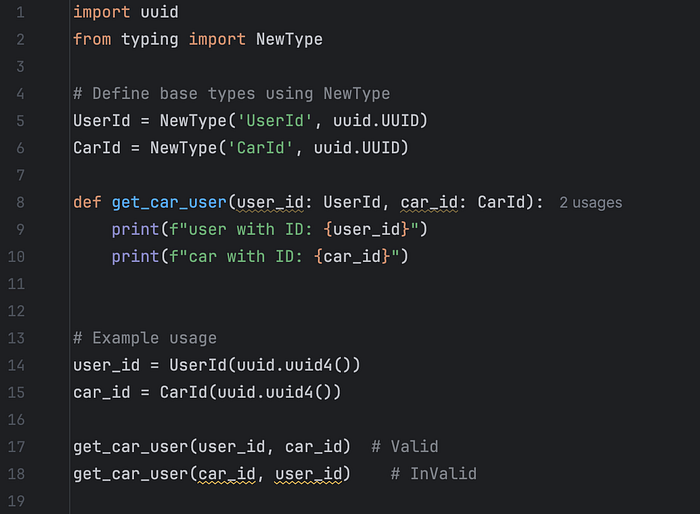
My IDE catches the error directly with this message, and if this is not the case, MyPy will throw an error during the type checking.
Expected type ‘UserId’, got ‘CarId’ instead
Conclusion
The branded type I found is an underrated practice in software development. It can catch many mistakes quickly and reduces your teams’ mental load.
Tips 2: Frozen Data Class
Python allows for multiple representations of a class. The best way is to use the data class system with the frozen attribute set to True.
In Python, each class is mutable by default. If you create a class A with a value, you can modify the same instance on the following line. For me, this is the origin of future bugs. I prefer a typing system with immutable variables, similar to functional programming.
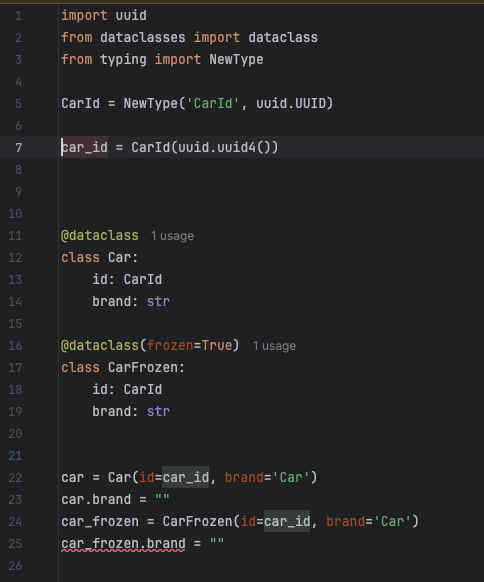
The dataclass with the frozen attribute set to True makes each variable read-only. My IDE catches the error directly with this message:
'CarFrozen' object attribute 'brand' is read-only
And if you run your code, Python will throw an error like this:
Traceback (most recent call last):
  File "/Users/hugomufraggi/test/python_stuff/main.py", line 25, in <module>
    car_frozen.brand = ""
    ^^^^^^^^^^^^^^^^
  File "<string>", line 4, in __setattr__
dataclasses.FrozenInstanceError: cannot assign to field 'brand'
Conclusion
Using dataclass in Python promotes better coding practices by making classes more concise and easier to read. By enabling immutability with the frozen option, dataclass helps prevent unintended modifications to objects, which is particularly valuable in contexts such as parallel systems or environments where data integrity is crucial. This can also shorten the lifespan of instances, ensuring that they are used, controlled, and predictable. Overall, dataclass enhances the robustness and maintainability of the code while supporting rapid and well-structured development.
Tips 3: Avoid Model Tensioning
When building an API, it’s common to have endpoints that interact directly with your database, like listing cars stored in your database. Returning your database models directly as API responses might seem convenient if you use libraries like Pydantic, SQLModel, or FastAPI.
However, doing this introduces a risk known as model tensioning. This occurs when your API is tightly coupled with your database schema. For example, if you modify your database schema to add new fields or change existing ones, the structure of the data returned by your API will also change. This can lead to unexpected issues in your frontend applications (web or mobile), as they may not be equipped to handle the new or altered data structure.
Decoupling your database models from your API responses is crucial to avoid this. Instead of returning your database schema directly, you should define separate Pydantic models representing the data structure you want to expose via your API. These models can be more stable and abstracted from the underlying database, ensuring that changes to your database schema don’t inadvertently affect your API’s consumers.
from pydantic import BaseModel
from sqlmodel import SQLModel

class Car(SQLModel):
    id: CarId
    make: str
    model: str
    year: int


class CarResponse(BaseModel):
    make: str
    model: str
    year: int

# Example endpoint using FastAPI
from fastapi import FastAPI

app = FastAPI()

@app.get("/cars/", response_model=List[CarResponse])
def list_cars():
    db_cars = get_cars_from_db()
    return [CarResponse(make=car.make, model=car.model, year=car.year) for car in db_cars]
Conclusion
In conclusion, while it may seem convenient to directly expose your database models through your API, this approach can lead to significant issues as your application evolves. You ensure greater flexibility and stability in your API design by clearly separating your database schema and your API response models. This decoupling protects your frontend applications from unexpected changes and promotes cleaner, more maintainable code. Adopting this best practice helps you build robust APIs that can adapt to changes without disrupting the user experience.
Tips 4: Stop Using bool
This tip is simple but impactful: replace your bool values with an Enum. By doing so, you drastically increase the expressiveness of your code and reduce the risk of confusion or misunderstanding about what a True or False value actually represents.
Using an Enum makes your code more descriptive and easier to read and enables more advanced patterns, such as pattern matching with the match-case syntax introduced in Python 3.10. This can lead to cleaner, more maintainable code, especially when you have multiple conditions to handle.
from enum import Enum

class Status(Enum):
    ACTIVE = "active"
    INACTIVE = "inactive"
    PENDING = "pending"

# Example status
status = Status.ACTIVE

# Using match-case for handling different statuses
match status:
    case Status.ACTIVE:
        print("The system is active")
    case Status.INACTIVE:
        print("The system is inactive")
    case Status.PENDING:
        print("The system is pending")
    case _:
        print("Unknown status")
Conclusion
Why Use Enum with match-case Instead of bool?
- Clarity: The Enum provides clear, descriptive states more informative than simple True or False values.
- Readability: The match-case syntax cleanly handles multiple cases, making it easier to understand and maintain the code.
- Scalability: As your logic grows more complex, adding new cases is straightforward and doesn’t require refactoring boolean checks.
Tips 5: Use Together Generic Type and Abstract Class
Python has implemented a generic type system since Python 3.5. Although it is less known within the community, it is mighty. If you are using the abstract class system, you can provide perfect code. For example, you can make a fully typed generic HTTP client or a CRUD operation for a Mongo repository.
Practice
First, we want to create the abstract class with a generic type defined like this:
T = TypeVar(‘T’). With this code, we have defined each CRUD function only once for all future documents.
from abc import ABC, abstractmethod
from typing import TypeVar, Generic, List, Optional, Type
from pymongo.collection import Collection
from bson import ObjectId

T = TypeVar('T')

class MongoCRUD(ABC, Generic[T]):
    def __init__(self, collection: Collection, model: Type[T]):
        self.collection = collection
        self.model = model

    def create(self, item: T) -> T:
        item_dict = item.__dict__.copy()
        if '_id' not in item_dict:
            item_dict['_id'] = ObjectId()
        result = self.collection.insert_one(item_dict)
        item.__dict__['_id'] = result.inserted_id
        return item

    def read(self, item_id: str) -> Optional[T]:
        data = self.collection.find_one({"_id": ObjectId(item_id)})
        return self.model(**data) if data else None

    def update(self, item_id: str, item: T) -> Optional[T]:
        item_dict = item.__dict__.copy()
        item_dict.pop('_id', None)  # On ne met pas à jour l'_id
        result = self.collection.update_one({"_id": ObjectId(item_id)}, {"$set": item_dict})
        return item if result.modified_count > 0 else None

    def delete(self, item_id: str) -> bool:
        result = self.collection.delete_one({"_id": ObjectId(item_id)})
        return result.deleted_count > 0

    def list(self) -> List[T]:
        return [self.model(**data) for data in self.collection.find()]
Secondly, we want to initialize the CarRepository very quickly:
from dataclasses import dataclass, field

@dataclass
class Car:
    make: str
    model: str
    year: int
    _id: str = field(default_factory=lambda: str(ObjectId()))

class CarRepository(MongoCRUD[Car]):
    def __init__(self, collection: Collection):
        super().__init__(collection, Car)
And then we want to use it:
from pymongo import MongoClient

client = MongoClient("mongodb://localhost:27017/")
collection = client.mydatabase.cars
car_crud = CarCRUD(collection)


new_car = Car(make="Toyota", model="Corolla", year=2021)
created_car = car_crud.create(new_car)
print(f"car created ID: {created_car._id}")
Conclusion
This combination will limit the multiple code duplications and allow you to focus your development efforts on actual, value-added features.
Conclusion
These tips will enhance your Python development journey and help you write more efficient and maintainable code. If you have any additional tips or insights, please share them in the comments — I’d love to hear your thoughts! To stay updated with my latest articles and support my work, consider subscribing to my Medium. Your encouragement means a lot. Until next time!